How Lorentzian Classification Compares Market Conditions
Start with three distinct ideas: features describe a bar, distance compares feature values, and a vote combines historical labels. Filters and kernel regression then affect how the chart presents and uses that information.
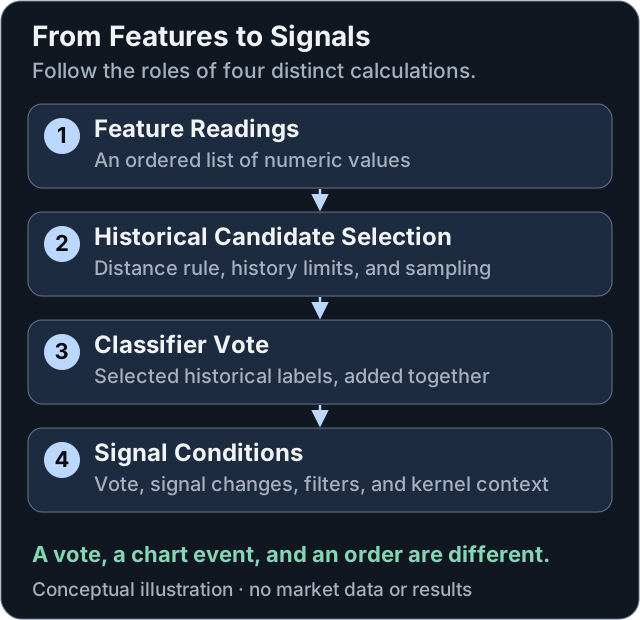
Conceptual flow, drawn for this guide from the public indicator structure. It separates the classifier vote from the later conditions that produce markers and alerts; it is not a chart or a performance result.
Features: Describe the Market
A feature is a numeric series, such as RSI, WaveTrend, CCI, or ADX. At a given bar, the enabled features form a vector: an ordered list of readings. Historical bars have their own vectors. Choosing features and their lengths changes what “similar” means.
Using the same feature twice gives its distance contribution extra weight; it does not add independent evidence. Features with different scales also contribute differently. Feature engineering and custom sources explain how to make those choices deliberately.
Lorentzian Distance
For current vector x and historical vector y, the indicator's distance is:
delta[j] = abs(x[j] - y[j])

d(x, y) = sum of ln(1 + delta[j])
          over enabled features j
ln is the natural logarithm. Identical vectors have distance zero. Larger feature differences increase the distance, but the logarithm compresses their contribution. This is the formula in the public Pine implementation.
For a two-feature example, compare differences (4, 0) with (2, 2):
| Differences | Euclidean distance | Implemented Lorentzian distance |
|---|---|---|
(4, 0) | sqrt(16) = 4 | ln(5) ≈ 1.609 |
(2, 2) | sqrt(8) ≈ 2.828 | 2 × ln(3) ≈ 2.197 |
The ranking reverses. Euclidean distance ranks the second pair as closer; this Lorentzian rule ranks the first as closer. Neither ranking proves better trading performance. Feature selection, scaling, data, and evaluation all matter.
The distance viewer illustrates this change in neighborhood geometry. Its 3D shape is a mathematical illustration with artistic styling, not a measured distribution of market returns. “Price-time warping” is a metaphor, not a claim about physical spacetime or an economic-event feed.
Neighbors and the Vote
The script uses an approximate neighbor-selection procedure with sampling and history constraints. It does not simply sort every historical bar and guarantee the globally closest set. Neighbors Count, Max Bars Back, and the available training controls affect the observations it considers.
The selected labels are added into a vote. For eight labels, six +1 votes and two −1 votes sum to +4. This is a vote total, not 4%, 50%, or a calibrated probability of a price rise. The vote sums at most Neighbors Count labels, so with the default of 8 it ranges from −8 to +8. A strong vote can still be wrong.
A positive vote also need not create a new long-entry marker on every bar. Entry logic considers signal changes and the enabled conditions. A zero vote or a failed filter is not, by itself, an instruction to close an existing position.
Filters and Kernel Regression
Filters gate signals using conditions such as volatility, regime, trend strength, or price relative to a moving average. More filters can suppress both useful and unhelpful signals; they do not establish that remaining trades are safer. See Filter Settings.
Kernel regression computes a weighted average of historical prices. Its weighting function and parameters control the estimate's shape. It is not the neighbor vote and does not automatically discover the best settings. The kernel's direction and crossovers can participate in entry filtering and exit logic. See Kernel Settings.
Three Outputs That Are Easy to Confuse
| Output | What it means |
|---|---|
| Vote label on a candle | The classifier's summed historical labels. |
| Entry, exit, pullback, or reversion marker | An event produced by the relevant signal logic and enabled settings. It does not place a broker order by itself. |
| Backtest stream | Encoded events intended for a compatible adapter. Its numbers are not the vote and must be mapped explicitly. |
Studio's indicator position signal uses posture values: +1 for long, -1 for short, and 0 for flat. Do not connect a Premium event-code stream as though the numbers mean the same thing. Read the Optimizer's backtest-signal instructions and verify any adapter before evaluating results.
Evaluate a Hypothesis
Record the version, symbol, timeframe, date range, input values, entry and exit rules, and costs. Compare settings under the same assumptions, then check data that did not guide the changes. The on-chart trade statistics support calibration; they are not a replacement for a complete backtest with explicit execution assumptions.
For the visible shapes and alert setup, continue to Symbols and Alerts.