Discover original TradingView indicators, including Lorentzian Classification. Edit and backtest supported Pine Script, then compare strategy settings in AI Edge Studio, powered by WebAssembly in your browser.
Build your analytical edge. Compute at the edge, on your device.
LorentziandistanceLog-scaled absolute differencesEuclideandistanceL2 · straight-line distanceBhattacharyyadistanceGaussian means · fixed covarianceManhattandistanceL1 · sum of absolute differencesHyperbolicdistanceHyperboloid model · curved surfaceMinkowskidistancep = 4 · rounded-cube geometryChebyshevdistanceMaximum coordinate differenceMahalanobisdistanceCovariance-adjusted distance · ellipsoidDynamictimewarpingOptimal sequence alignment · illustrative signals
↓ A closer lookOriginal indicators. Deeper exploration. Your device.
Two ways to investigate the markets.
Read signals with Lorentzian Classification. Test strategy behavior in AI Edge Studio.
01 / LORENTZIAN CLASSIFICATION
Find context in market history.
Compare current indicator readings with selected historical patterns and combine their directional votes.
Created by TradingView Wizard Justin Dehorty (jdehorty), Lorentzian Classification uses a logarithmic distance calculation to reduce the influence of large feature differences. Selected for TradingView Editors’ Picks, the original open-source indicator also won a Best Editors’ Picks of 2023 award and Gold for Most Valuable Pine Scripts at the 2023 TradingView Community Awards.
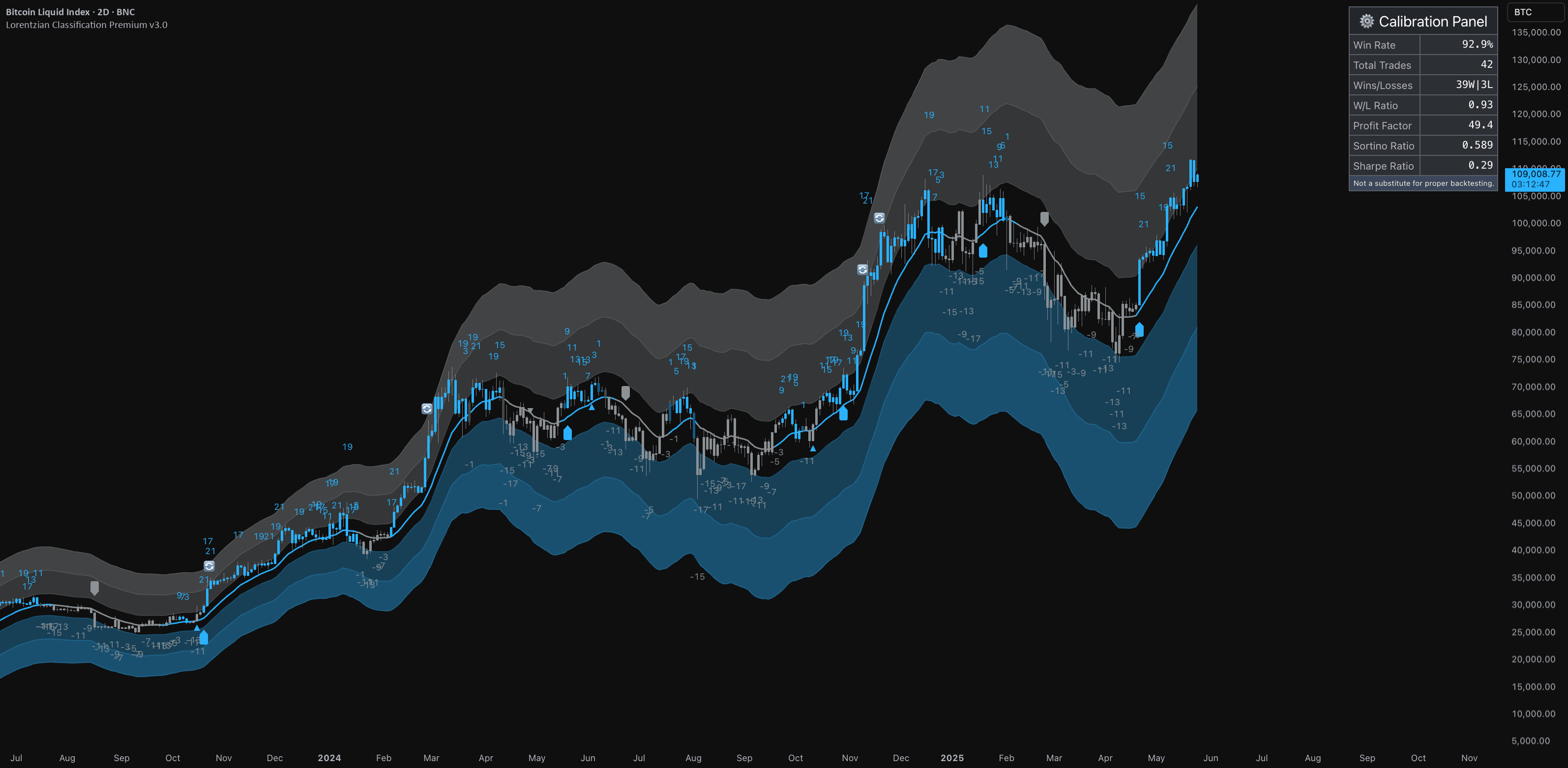
The original published Premium chart. Open the image to inspect every detail. Historical chart; calibration statistics are not a backtest or forecast.
LORENTZIAN CLASSIFICATION PREMIUM
Your indicators, working together.
Build on your own analysis with up to 15 features, including up to 10 custom sources. Add pullback and mean-reversion signals, with kernel-based context for reading the chart.
Build with up to 15 features, including custom sources.
See trend, pullback and reversal signals in context.
Tune filters, visual settings and alerts to your workflow.
More than three years of development, including the community beta. The May 2025 public release followed collaboration with more than 1,000 beta testers.
Explore how your strategy behaves across parameter choices and different market regimes. Start with this live surface to see how parameter changes affect results over the selected historical period.
BITCOIN · MOVING-AVERAGE STRATEGY
Hypothetical return—
Prepare the local strategy, then explore its parameter space.
COINBASE:BTCUSD · 1DDrag to pan · pinch or use zoom controls
PineWASM brings a Rust-built compiler and WebAssembly runtime to your browser. Prepare a supported Pine Script® strategy once, then reuse the compiled program to explore parameter choices and market history on your device.
We believe the next generation of AI tools belongs on personal devices as well as in the cloud. More capable tools. More understanding. More control over your work.
Edit scripts, view their plots and save source and Settings in your browser. Cloud source sync is an explicit per-script choice. Export a copy to keep your work portable.
PineWASM parses and checks supported Pine Script®, then compiles it into a reusable instruction format called CSIL. A runtime executes those instructions bar by bar. A separate route can compile supported programs further into script-specific WebAssembly.
Pine Script®PineWASM compilerCompiled instructionsLocal execution
The browser uses JavaScript to host and communicate with the WebAssembly engine; PineWASM does not translate your script into JavaScript source. Compatibility and available outputs vary by route. The compiler’s public release is still ahead; the open research link above is for Lorentzian Classification.
Browser computation is one part of an Optimizer study. Account-backed studies still send compiled strategies, data, configuration and results to AI Edge. Read the full data-flow guide.
The original Lorentzian Classification indicator is open source. Studio can be explored before signing in, and a Free account runs compatible browser studies without Optimizer credits.
Know what is shared.
Ordinary editing, your local library and local Settings saves stay in the browser. Starting a study sends the dataset, configuration, parameters and compiled strategy to AI Edge.
Check script compatibility.
Compatibility depends on the language features and outputs a script uses. Studio reports what compiles.
Premium comes with membership.
An eligible direct AI Edge membership includes Premium indicator access with no separate TradingView Paid Space subscription. Connect your TradingView username to activate it.
What can I use for free?+
The original Lorentzian Classification indicator is open source on TradingView. You can also explore Studio, load samples and edit supported scripts before signing in. A Free AI Edge account can run compatible browser studies without Optimizer credits. See the free workflow.
Do I also need TradingView Paid Spaces?+
No separate Paid Space subscription is needed for the Premium indicator access included in an eligible direct AI Edge membership. Lorentzian Classification Premium is also offered in the AI Edge Paid Space, billed and activated through TradingView. Direct members connect their TradingView username through AI Edge. Paid Space membership alone does not include AI Edge membership, cloud credits or Deep Forecast. TradingView platform plans and market data are separate. Read the activation guide.
Does everything stay on my device?+
Not everything. Ordinary Studio editing and the local script library stay in that browser, and so do Settings saves unless saved Settings sync is on for your signed-in paid account. Starting an account-backed study sends the dataset, configuration, parameter information and compiled strategy to AI Edge. While a browser study runs, your browser sends each trial’s parameter values, trade signals and score. If you enable cloud sync for a script, it also uploads that script’s source, attached libraries and saved versions, then syncs future saves. Synced Settings are separate and do not contain source or libraries. Cloud execution and assistant connections also use hosted services. See exactly what is stored and sent.
Will every Pine script work?+
Compatibility depends on the language features, execution route and outputs a script uses. Studio reports compilation diagnostics, and optimization requires a supported backtest signal. PineWASM is AI Edge’s independent compatibility implementation. It is not TradingView’s compiler. Start with a supported example.
Are cloud storage and parallel studies available?+
Eligible paid plans offer cloud execution with plan-specific credits and concurrency. Compatible browser studies are also available on Free accounts. Paid plans sync new and changed Settings between devices where the service is enabled; Settings already in your account still sync on Free. Eligible accounts can also enable source sync for individual scripts in the Script Library. Check your account’s available controls before relying on cloud storage. Connecting your own AI assistant over MCP comes with the Max plan, and it can work with cloud studies and uploaded datasets. During the beta, an AI Edge administrator also has to add your account. Read the storage guide or connect an assistant.
What does an optimization result tell me?+
It describes the configurations tested on the chosen historical data, under that study’s scoring and simulation assumptions. The search samples the parameter space; it does not test every possible combination. On a parameter landscape, the shading between measured trials is estimated, not backtested. Neither a high score nor a smooth landscape is a forecast of future returns. Learn to read the results.